How to Build an AI Agent Team That Actually Works Together (Claude Code + MCP + Skills)
"Just copy-paste it into the other chat."
I must have said that to myself a hundred times last year. Running one AI for research, another for writing, switching tabs, losing context, watching my carefully crafted prompts dissolve into generic responses because the new chat had no idea what I'd been working on for the past hour.
It was exhausting.
Here I was using the most advanced AI tools ever created, and my workflow looked like I was playing telephone with myself.
Then I discovered something that changed everything. Claude Code doesn't just let you chat with AI. It lets you build an actual AI team. Multiple agents with distinct roles, shared context, real tools, and the ability to hand work off to each other without you being the middleware.
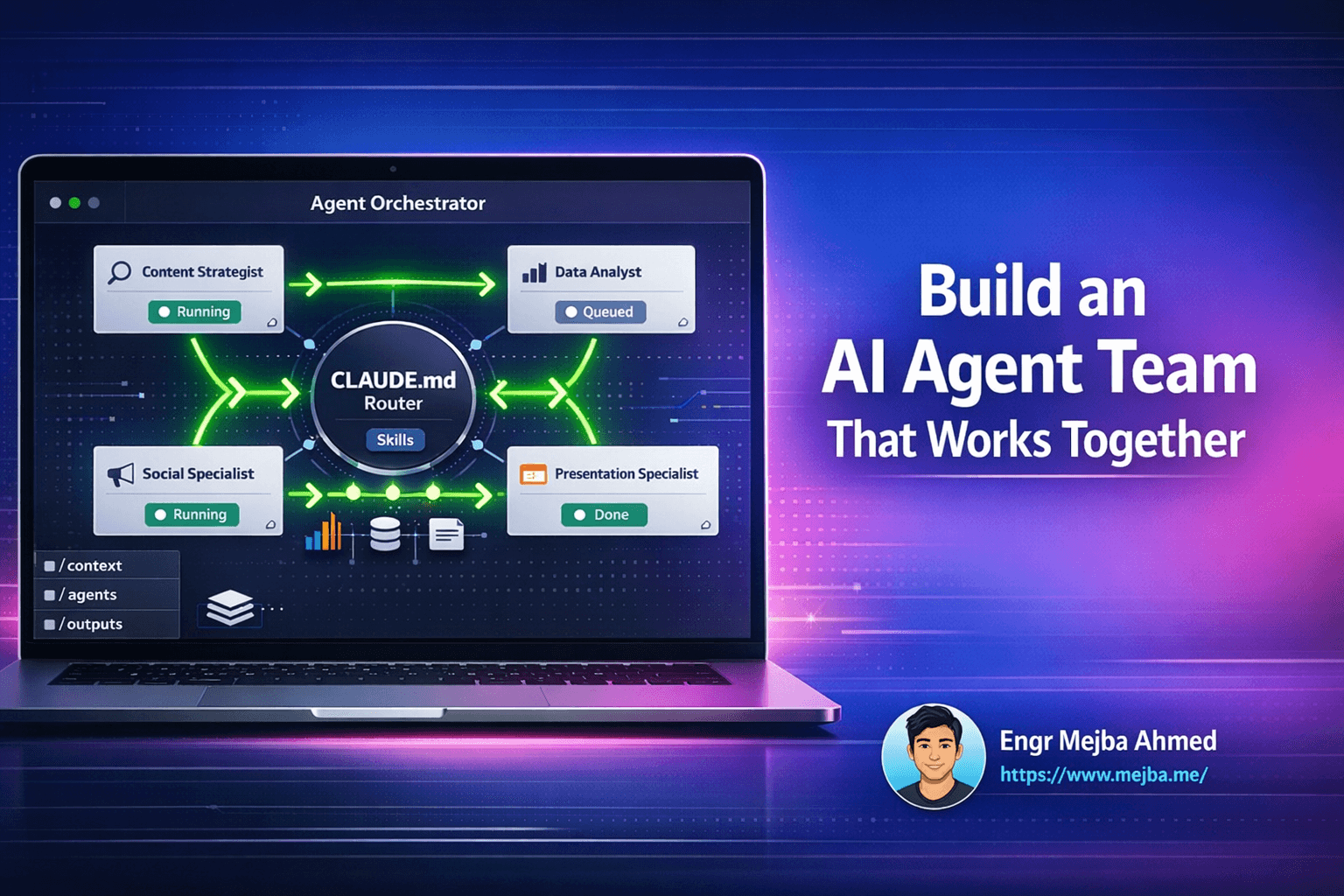
I built a marketing team of AI agents last month. A content strategist, a data analyst, a presentation specialist, and a social media manager. They share files. They read each other's outputs. They produce brand-aligned content without me copy-pasting a single thing.
Here's exactly how I did it.
The Problem Nobody Talks About
Let's be honest about how most of us use AI tools in 2025.
We have conversations in silos. A research conversation here. A writing conversation there. A coding session somewhere else. Each one starts fresh. Each one needs context re-explained. Each one produces outputs that need to be manually stitched together.
This works fine for quick questions.
But for real work? Complex projects with multiple phases? Content that needs research, then writing, then visual assets, then scheduling?
It's a nightmare.
I was spending more time coordinating between AI chats than actually getting work done. The irony wasn't lost on me. Automation that requires constant manual intervention isn't really automation at all.
Context dies between sessions. Start a research conversation, get great insights, switch to a writing tool, and suddenly you're explaining everything from scratch.
Brand consistency vanishes. One AI uses formal language, another goes casual, a third invents a color palette that makes your design team cry.
Handoffs require human middleware. You become the translation layer between tools. Copy this output, massage it, paste it there, explain what you need, repeat infinitely.
Complex workflows break down. Anything requiring more than two steps becomes a coordination headache.
I kept thinking there had to be a better way.
What Claude Code Actually Does
Here's what took me a while to grasp: Claude Code isn't just a better chat interface. It's an orchestration system.
Regular Claude works in isolation. You ask questions, you get answers, end of story.
Claude Code turns Claude into a team lead that can manage multiple specialized agents, each with their own roles, tools, and capabilities.
Think of it like this. Regular Claude is a brilliant freelancer who works alone. Claude Code is that same freelancer, but now they can hire subcontractors, delegate tasks, review work, and coordinate delivery.
The architecture is surprisingly simple:
Shared workspace. All agents work from the same project folder. Context files, templates, outputs—everything lives in one place that everyone can access.
Agent definitions. Each agent gets a markdown file defining their role, knowledge base, and available tools. It's just text.
MCP tools. Integrations with external systems. Google Analytics, Notion, Ahrefs, whatever your workflow needs. Agents can pull real data and push outputs to real platforms.
Skills. Reusable instruction sets that enhance what agents can do. Official skills for document creation, custom skills for your brand guidelines.
Routing rules. A central system prompt that tells Claude when to delegate to which agent based on the task at hand.
Claude becomes the team lead, automatically routing tasks to the right specialist and coordinating handoffs. You give it a complex task, and it breaks it down, assigns pieces to appropriate agents, and stitches everything back together.
No copy-pasting. No manual coordination. No context loss.
Building My First AI Team
I decided to start with a marketing team because that's where my workflow was most broken.
Here's how I structured it:
Agent 1: Content Strategist
Handles research and content planning. Conducts web searches, analyzes competitor content, produces detailed briefs following our templates.
No fancy tools here. Just a well-defined role and access to the shared knowledge base. I gave it our content guidelines, target audience profiles, and examples of successful posts.
Instead of asking "write me a blog brief," I can ask for "competitive research on Claude Code tutorials targeting intermediate developers" and get something that actually fits our strategy.
Agent 2: Data Analyst
This is where MCP tools shine.
I connected this agent to our Google Analytics 4 account, Ahrefs for SEO data, and Notion for our content calendar. Now it can pull real numbers. Actual traffic data. Current keyword rankings. What's performing, what's not, what opportunities exist.
The output? Interactive HTML dashboards. Charts that mean something because they're based on our data, not hypotheticals.
Setting up MCP was the hardest part. The documentation exists but it takes patience. Once it's working though? Game changer.
Agent 3: Presentation Specialist
Slide decks used to be my most hated task.
This agent uses document creation skills to produce polished presentations. I fed it our brand colors, typography rules, and slide templates. Now it generates decks that actually look like they came from us.
Ten-slide performance report? Done. Quarterly review? Done. Pitch deck? Done. All brand-aligned without manual cleanup.
Agent 4: Social Media Specialist
Drafts posts with visuals, formats them for different platforms, and schedules them directly to our Notion content calendar.
I built a custom skill based on official design skills but tuned for our brand. Specific image dimensions. Our color palette. Our voice guidelines.
The outputs don't look like generic AI content because they're trained on our specific aesthetic.
The Workflow That Made Me Believe
Here's the moment it clicked.
I gave Claude a simple request: "Research our top competitor's content strategy, create a blog post outline based on gaps we can fill, draft the full post, then create a presentation deck summarizing the strategy."
Four distinct tasks. Previously? That's four separate conversations, hours of coordination, context re-establishment at every step.
With the agent team? I watched it work.
First, the Content Strategist pulled competitor data, identified content gaps, and produced a detailed brief. That brief was saved to our shared workspace.
Then, the writing process began. Full access to the strategist's research. No context loss. The post came out coherent with the strategy because it literally built on the same foundation.
Finally, the Presentation Specialist took everything—the research, the strategy, the key points from the blog—and created a deck. Same sources. Same context. Same brand.
Total time: about twenty minutes of Claude working while I grabbed coffee.
The output wasn't perfect. Some sections needed editing. One slide had a weird chart. But the foundation was solid, and the pieces fit together because they were built together.
That's when I understood: this isn't about any single AI being smarter. It's about coordination. Context persistence. Specialization without isolation.
How Agent Definitions Actually Work
Each agent lives in a single markdown file. Here's my Content Strategist:
# Content Strategist

## Role
Senior content strategist responsible for research, topic development,
and content planning.

## Responsibilities
- Conduct web research on assigned topics
- Analyze competitor content gaps
- Create detailed content briefs with SEO recommendations
- Define target audiences and search intent

## Templates
All content briefs follow /templates/content-brief.md

## Output
Save completed briefs to /briefs/
Include keyword research, outline, and competitor analysis.
That's it. One markdown file defines an entire specialized agent.
The power isn't in complexity. It's in clarity. Clear role boundaries mean less confusion about who handles what.
MCP: Where Agents Get Real Capabilities
MCP stands for Model Context Protocol. It's a standard for connecting AI agents to external tools and data sources.
Instead of describing data to Claude, MCP lets agents access systems directly.
My Data Analyst doesn't need me to export GA4 reports and paste them in. It queries GA4 directly through the MCP server.
Setting Up MCP Servers
If you've configured MCP servers in Claude Desktop already, importing them is one command:
claude mcp add-from-claude-desktop
In my setup, this pulled in three servers:
notionApi- Database access and content calendarahrefs- SEO research and keyword dataGA4-mcp- Google Analytics 4 queries
Now I can authorize specific agents to use specific tools. The Data Analyst gets GA4 access. The SEO Specialist gets Ahrefs. The Social Media Specialist gets Notion for scheduling.
Clean boundaries. No tool sprawl.
What MCP Access Looks Like
When I ask for a weekly performance report, here's what happens without my intervention:
- Data Analyst receives the request
- Queries GA4 for traffic, conversions, top pages
- Pulls the data programmatically
- Builds an interactive HTML dashboard with charts
- Generates a PDF export for stakeholders
- Saves everything to
/output/dashboards/
No manual data export. No pasting numbers into spreadsheets. The agent does the entire workflow.
Custom Skills: Making Agents Brand-Aware
Skills are reusable instruction sets that enhance agent capabilities.
Default AI-generated content looks like AI-generated content. Generic colors. Safe layouts. No personality. When my Social Media Specialist created visuals, they came out looking like every other AI-made graphic.
So I extended the base visual skills with brand-specific instructions:
# Branded Social Visuals

## Color Palette
Primary: #FF6B35 (energetic coral)
Secondary: #004E89 (deep trust blue)
Accent: #F5F5F5 (clean white)

## Typography
Headlines: Bold, condensed, uppercase
Body: Clean sans-serif, high readability

## Visual Style
- High contrast compositions
- Geometric shapes over organic forms
- Photography: candid, diverse
- Minimal decorative elements
Now every visual the Social Media Specialist creates follows our brand guidelines. Consistency without manual enforcement.
The Routing System
The CLAUDE.md file is where orchestration happens:
# Marketing Team Workspace

## Agent Routing
- Content research and planning → Content Strategist
- Analytics, dashboards, data → Data Analyst
- Social media posts and visuals → Social Media Specialist
- Presentation decks → Presentation Specialist
- Long-form SEO content → SEO Content Specialist

## Shared Context
All agents can access:
- /context/brand-voice.md
- /context/visual-identity.md
- /context/target-audiences.md

## Handoff Protocol
When work transfers between agents:
1. Save all outputs to appropriate /output/ subfolder
2. Include summary brief for receiving agent
3. Reference source files explicitly
With routing rules, I don't need to specify which agent handles a request. "Create a content strategy for Q1" automatically goes to the Content Strategist. "Build a performance dashboard" goes to the Data Analyst.
Claude becomes the dispatcher, not the worker.
The Trust Problem You Can't Ignore
Before you go all-in on AI teams, let's talk about something the hype cycle ignores.
HubSpot and SurveyMonkey surveyed 15,000+ global consumers about AI-generated content. The results should make you pause:
- Only 24% of consumers favor AI-generated content in emails, ads, or support
- 84% want transparency about AI involvement
- Trust erodes when brands hide automation
This isn't a reason to avoid AI workflows. It's a reason to implement them thoughtfully.
Human review stays in the loop. Every deliverable gets human review before going live.
Transparency matters. When AI generates customer-facing content, they should know.
Quality over quantity. AI workflows can 10x your output. That doesn't mean you should 10x your publishing.
Voice consistency. Custom skills ensure AI output sounds like you. Generic AI content erodes brand identity.
Common Setup Mistakes
After building several agent teams, here's what trips people up:
Overlapping responsibilities. If two agents could both handle a request, you'll get conflicts. "Content" is too vague. "SEO-optimized blog posts between 2,000-5,000 words" is specific.
Tool authorization sprawl. Giving every agent access to every MCP tool defeats specialization. Constrain tools to what each agent actually needs.
Missing context files. If your brand voice guidelines exist only in your head, agents will guess—and guess wrong. Invest in comprehensive context documentation.
Vague routing rules. Be specific: "All requests involving Google Analytics data → Data Analyst."
Getting Started
You don't need five agents on day one. Start small:
Step 1: Create a project folder
mkdir marketing-team
cd marketing-team
Step 2: Write your first agent
Create .claude/agents/content-strategist.md with a clear role definition.
Step 3: Add basic routing
Create CLAUDE.md with routing rules for your first agent.
Step 4: Import MCP tools (if using them)
claude mcp add-from-claude-desktop
Step 5: Run one workflow Test a single task end-to-end before expanding.
Add agents as you identify clear, non-overlapping roles. Build the team incrementally.
Where This Is Going
I've been thinking about where AI teams lead us.
Right now, I'm coordinating five agents in a shared folder. But the patterns scale. The same architecture—specialized agents, shared context, automatic routing—could coordinate across departments.
Marketing agents handing off to Sales agents. Product agents coordinating with Engineering. Customer Success agents pulling from Support agents.
Not replacing humans. Handling the coordination overhead that currently burns countless hours.
The shift from "AI assistant" to "AI team" fundamentally changes what's possible.
You're not being replaced. You're being promoted to team lead.
The only question is whether you'll build your team now or wait until everyone else has already figured it out.
🤝 Hire / Work with me:
- 🔗 Fiverr (custom builds, integrations, performance): fiverr.com/s/EgxYmWD
- 🌐 Mejba Personal Portfolio: mejba.me
- 🏢 Ramlit Limited: ramlit.com
- 🎨 ColorPark Creative Agency: colorpark.io
- 🛡 xCyberSecurity Global Services: xcybersecurity.io